
If you need scientific articles and ebooks for your coursework, thesis, or daily research, paywalls block many of them. You can access the full text through free, legal sources at your university library. Universities subscribe to literature databases – universal ones like Web of Science and Scopus (which contain source indexes), Jstor, and ScienceDirect (both provide full text), etc. Start with simple steps that usually work.
Open Google Scholar (completely free) in your browser. Enter the paper title (actually, you can use keywords), author name (if you are looking for a specific author). Check the right side of each entry for a PDF link in the Results page. You will be forwarded to the resources where this particular document exists. 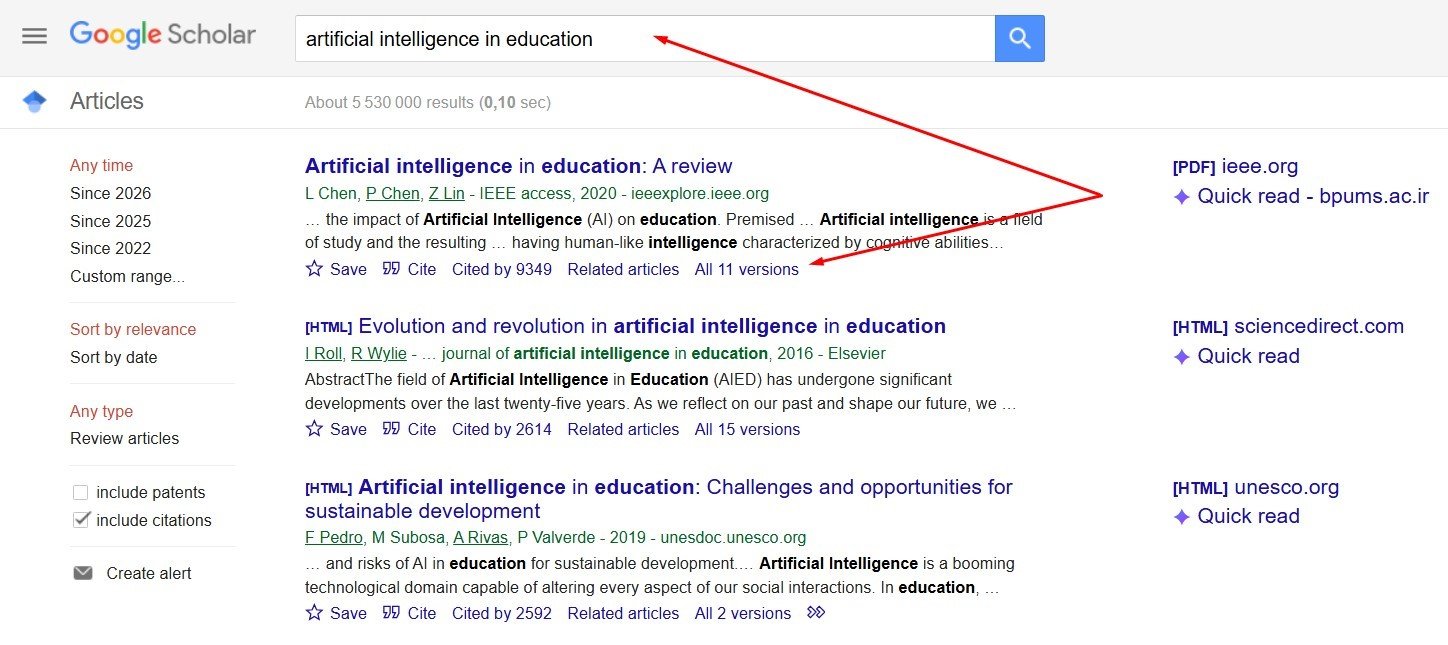
Fig.1. Google Scholar search results
Click the link to open it and save the free copy if it is available. Under many results you can see the word „All versions“ (Fig.1). When you click them, the list shows titles from university repositories, preprint servers, and author pages. Select the one you consider useful and download. This method finds free versions of a large share of recent papers across numerous scientific fields You can use this first in every literature search because the index covers millions of documents and surfaces legal open copies without extra tools.
Install the Unpaywall extension (Unpaywall is an open DB of about 60 mln free sholcary artricles). for your browser . After installation the tool runs in the background. When you arrive on a publisher page with a paywall, a green unlocked icon appears on the screen. The tool opens the legal free version from a repository or open archive. The same process works with the Open Access Button extension. Both tools check millions of records from publishers and repositories. You can keep them active throughout your entire browsing session, and free copies will appear without the need for additional search queries.
For health, biomedical, and life sciences you can go straight to PubMed Central and search the title or keywords. Apply the free full-text filter on the side. Every result with the free link leads to the complete PDF or HTML. The archive holds millions of articles because many funders require deposit of the final version somewhere and this is the best place to do this. In a matter of minutes, you can download whatever you need for the sections describing methodologies or for familiarizing yourself with the theoretical foundation.
In physics, mathematics, computer science, and related areas you open arXiv which is a free distribution service and open-access archive. You can search by title, author, or category and find papers that sit as a free downloadable preprints. Many authors later publish the same work in journals (if it is not against a journal policy), yet the arXiv version already supplies the core results and equations for your own analysis. Similar preprint servers exist for biology and medicine. You check them when speed matters for a fast-moving topic.
Search the Directory of Open Access Journals which contains about 14 mln records, from about 15 000 peer-reviewed journals without a fee. Enter your topic, keywords and browse the matching journals or search inside them. All full texts can be opened without login. You cite these sources with confidence because the directory applies quality checks. For broader repository coverage you open CORE (https://core.ac.uk/) that aggregates open papers from thousands of university and subject repositories. One search returns direct PDF links. You can also add academic search engine BASE https://www.base-search.net/ or AI-powered Semantic Scholar https://www.semanticscholar.org/ for additional coverage of grey literature and citation context.
When no free version is available, write to the corresponding author. You can find the email address on the first page of the paper or on the author’s university profile. Send a short polite message. State the paper title, explain your student or doctoral use, and request a copy for personal research. For this same purpose, you can use the ResearchGate resource. Authors respond with the file in most cases because the practice implies part of normal scholarly exchange. You will receive the PDF within a day or two and continue your work.
Your university library supplies the remaining material. Log in to the library website with your student or staff credentials (usually university email), search the catalog or discovery tool for the article or ebook title. The system displays available full-text links. Click them and download (in most cases, not available) or read online from the screen. From off campus in many universities, the login routes your request through the library proxy. Publishers and DB owners then treat you as an on-campus user and grant access. You set this up once and reuse the same credentials for every session during a specific interval of time.
Configure Google Scholar to work with your library. Open Scholar settings, choose Library links, and search for your university name. Select the correct entry and save (Fig.2). New searches now show a library access link beside many results. Click the link, log in if asked, and open the subscribed version. The combination of Scholar and library links cuts search time during literature reviews. 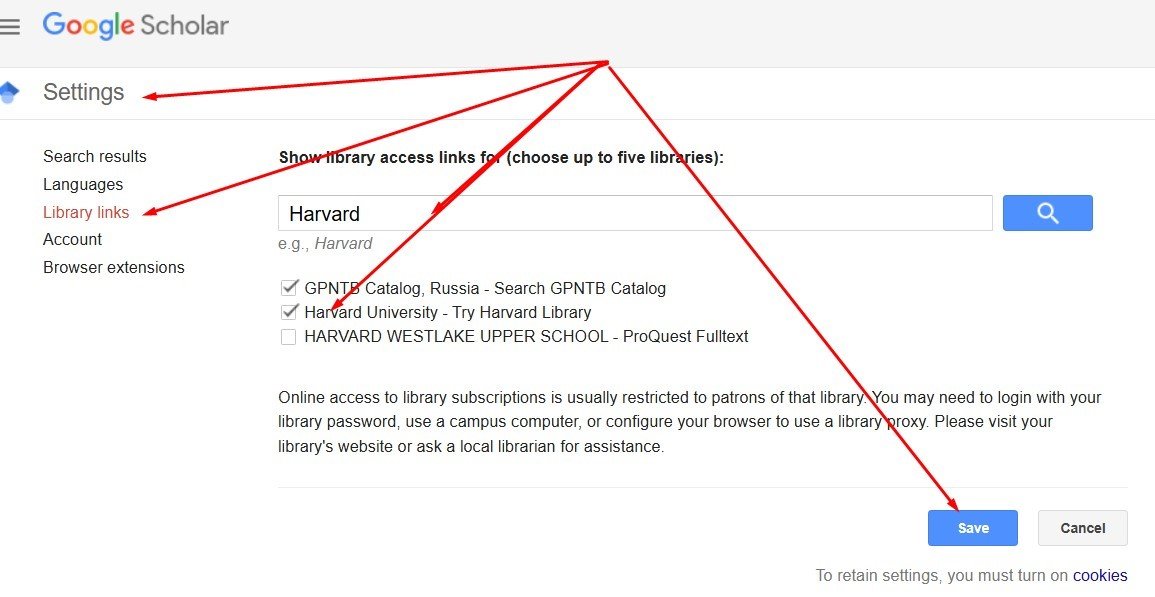
Fig 2. Combination of Scholar and library links
If the library lacks a needed item, use interlibrary loan. Submit the request through the library form with the full citation. Library staff will obtain the article or book chapter from a partner institution. Delivery arrives as a PDF or scan within a few days at no cost to you. You rely on this service for older or specialized material outside the main subscriptions.
Your library catalog can list thousands of electronic books. Search by title or subject, open the record, read from the screen, and download chapters or the full volume (if acceptable) according to the license. Many libraries also provide platforms such as Ebook Central (https://about.proquest.com/en/products-services/ebooks-main/) or JSTOR that hold additional titles. Outside the library, you open the Directory of Open Access Books that contains about 11500 peer revied, free access books. Search by subject. For core undergraduate textbooks you visit OpenStax https://openstax.org/ (contains free textbooks). The site supplies peer-reviewed publications in sciences, social sciences, and humanities. You can download the PDF or read online at no charge. These sources cover most required reading for courses and supply reference material for doctoral work.
In daily practice you should combine the tools. Suppose you write a paper on classroom technology in primary education. You begin in Google Scholar with the topic terms. PDF links appear for several recent studies. You install Unpaywall and open a promising paywalled article. The green icon delivers the accepted manuscript from an institutional repository. You check ERIC (https://eric.ed.gov/) for education-specific free documents and download them. Suppose, one needed book chapter is missing. You log into the university library, locate the ebook, and download or read the chapter. The remaining gap is filled by an interlibrary loan request. The full set of sources rests on your computer by the end of the afternoon.
Another common task is a systematic search in biology. You open PubMed Central first and apply free full text. Results give you core papers. You move then to Google Scholar for additional citations and follow the PDF links. Unpaywall catches any remaining publisher pages. Preprints from bioRxiv (preprint server for biology) https://www.biorxiv.org/ supply the newest findings. Library login opens any subscription journals your university holds. The process stays the same whether you sit in the library, at home, or in a café.
Keep a simple habit. Record every useful source in a reference manager (you can use Mendeley) https://www.mendeley.com/ as you find it. Note the free PDF location or the library access path. Next time the same paper appears in a new search you retrieve the copy at once. Over time, the collection grows into a personal library of open and licensed material.
These steps are based on established services run by universities, funding agencies, and open-access organizations. Google Scholar indexes the open web of scholarship globally. Unpaywall and similar tools harvest only legal open versions. PubMed Central and arXiv operate under public mandates. University libraries negotiate subscriptions and proxy access for enrolled students and university staff. Interlibrary loan networks exchange documents under formal agreements. The result is stable and fast access to the literature you need without payment or delay.
And finally, for your searches, use artificial intelligence resources - for example, Perplexity. An article about this technology can be found here.
About the author: Teimuraz Kancheli is Head of the Electronic Resources Division at the Ivane Javakhishvili Tbilisi State University Library. His professional interests include AI for academic research, digital library services, electronic scholarly resources, and scientific publishing.
Further resources: [AI in Higher Education, professional profile.]
#ScientificArticles #FreeEbooks #UniversityLibrary #OpenAccess #GoogleScholar #Unpaywall #PubMedCentral #arXiv #DOAJ #InterlibraryLoan #StudentResearch #DoctoralStudies #AcademicResources #FreeResearchPapers #LibraryAccess


